Fiedler Audio Mastering Console 2.0 is the breakthrough standalone mastering application that finally brings traditional mastering workflows to Dolby Atmos. If you have been frustrated trying to master immersive audio with the same ease and precision you use for stereo, this Dolby-approved software is your answer.
🎛️ What It Does
| Feature | What it does | Perfect for |
|---|
| 🎚️ OBAM Plug-in Hosting | Run VST3 mastering plugins on entire Atmos mixes | EQ, compression, limiting across all channels |
| 📀 Album Creation | Build gapless albums with seamless crossfades | Full album mastering projects in Atmos |
| 📊 Loudness Tools | Automated LKFS measurement and adjustment | Meeting streaming platform standards |
| 🔊 True Peak Limiter | Transparent limiting for loudness compliance | Ensuring no clipping or distortion |
| 👁️ 3D Visualization | See beds and dynamic objects in space | Understanding spatial placement visually |
| ⚡ Batch Processing | Process multiple ADM/BWF files simultaneously | EP and album projects with consistent settings |
🎚️ OBAM Plug-in Hosting
What it does: Run VST3 mastering plugins on entire Atmos mixes
Perfect for: EQ, compression, limiting across all channels
📀 Album Creation
What it does: Build gapless albums with seamless crossfades
Perfect for: Full album mastering projects in Atmos
📊 Loudness Tools
What it does: Automated LKFS measurement and adjustment
Perfect for: Meeting streaming platform standards
🔊 True Peak Limiter
What it does: Transparent limiting for loudness compliance
Perfect for: Ensuring no clipping or distortion
👁️ 3D Visualization
What it does: See beds and dynamic objects in space
Perfect for: Understanding spatial placement visually
⚡ Batch Processing
What it does: Process multiple ADM/BWF files simultaneously
Perfect for: EP and album projects with consistent settings
🎯 Why Mastering Engineers Choose This
The Mastering Console 2.0 solves the biggest headache in immersive audio production: applying professional mastering workflows to Dolby Atmos mixes. Instead of bouncing stems or wrestling with complicated routing, you can now master ADM/BWF files with the same confidence and precision you have with stereo masters.
💡 Key Benefits
- Dolby Approved – officially sanctioned by Dolby Labs for professional mastering
- Use Your Plugins – host your favorite VST3 mastering tools on Atmos mixes
- Stereo and Atmos Together – master both formats in one workflow
- Album Ready – create gapless albums with professional crossfades
- Flexible Monitoring – speakers and headphones simultaneously with room calibration
🎨 Best Use Cases
- Music Mastering – albums and singles for streaming platforms
- Film and TV – immersive audio post-production finishing
- Album Projects – full-length releases with seamless track transitions
- Quality Control – loudness measurement and compliance checking
- Multi-Format Delivery – simultaneous Atmos, binaural, and stereo exports
🔬 The OBAM Plug-in Hosting Advantage
This is the game changer. OBAM (Object Based Audio Mixer) plug-in hosting lets you load your entire VST3 mastering chain and apply it to the complete Dolby Atmos mix – beds, objects, everything. No more bouncing stems or working channel by channel. Load up your favorite mastering EQ, compressor, or limiter and process the entire immersive soundfield just like you would a stereo master. This is the workflow mastering engineers have been waiting for.
🎧 Comprehensive Monitoring Options
Monitor your Atmos mixes on stereo, binaural, 5.1, 5.1.2, 5.1.4, 7.1, 7.1.2, 7.1.4, 9.1.4, and 9.1.6 speaker configurations. The software includes Dolby’s binaural rendering and Apple Spatial Audio support (even on Windows). Set up simultaneous speaker and headphone monitoring with flexible routing, plus calibrate each speaker with volume, delay, and EQ controls that save as presets for instant recall.
📋 Technical Specs
| 💻 Application Type | Standalone mastering application (not a plugin) |
| 🎚️ Plugin Hosting | VST3 plugins via OBAM for Atmos, full VST3 arsenal for stereo |
| 🖥️ Windows | Windows 10 or 11, Intel 2 GHz x64 with SSE3, 4 GB RAM, OpenGL 3.3 |
| 🍎 macOS | macOS 11 to 15, Intel 2 GHz or Apple Silicon, 4 GB RAM, OpenGL 3.3 |
| 🎵 Sample Rates | 48 kHz and 96 kHz Dolby Atmos workflows supported |
| 📺 Display | Minimum 1440 x 900 px resolution |
🚀 What You Get Right Now
✅ Instant Download – Start mastering Atmos projects immediately
✅ Dolby Approved – Officially sanctioned for professional Dolby Atmos mastering
✅ Full Feature Set – Album creation, batch processing, loudness tools, and visualization
✅ Plugin Hosting – Use your entire VST3 mastering plugin collection
✅ Multi-Format Export – ADM/BWF, binaural, Apple Spatial Audio, and stereo reference files
💡 Pro Tip: Album Mastering Workflow
When mastering a full album in Dolby Atmos, load all your tracks onto the timeline in the correct sequence. Set up your master chain with OBAM plugins once, and it applies to every track. Use the crossfade feature to create seamless transitions between songs where needed. Then batch process the entire album with loudness measurement and adjustment applied consistently across all tracks. Export everything simultaneously: the Atmos masters, binaural renders, and stereo references in one go. This workflow saves hours compared to processing each track individually.
❓ Frequently Asked Questions
Do I need a Dolby Atmos renderer?
No, the Mastering Console includes everything needed for monitoring and processing Dolby Atmos ADM/BWF files. It handles binaural rendering and speaker format playback internally.
Can I use my mastering plugins on Atmos mixes?
Yes, the OBAM hosting feature lets you load VST3 plugins and apply them to the entire Atmos mix. For stereo tracks, you can use your complete VST3 plugin collection.
What file formats does it work with?
It processes ADM/BWF Dolby Atmos files at 48 kHz or 96 kHz sample rates and can handle stereo reference mixes simultaneously for dual-format mastering workflows.
Can I create albums with crossfades in Atmos?
Absolutely. The timeline feature allows you to arrange multiple tracks and create seamless crossfade transitions between songs, just like traditional stereo album mastering.
Does it work with Apple Spatial Audio?
Yes, it includes Apple Spatial Audio monitoring and export capabilities on both Mac and Windows platforms, with or without head tracking hardware.
🎬 The Final Word
The Mastering Console 2.0 represents a genuine breakthrough for anyone working in immersive audio production. By bringing traditional mastering workflows into the Dolby Atmos domain with plugin hosting, album creation tools, and comprehensive loudness management, Fiedler Audio has created the professional mastering application that the immersive audio community has been demanding. Whether you are mastering music for streaming platforms, finishing film and TV projects, or creating full album releases, this Dolby-approved software delivers the precision, flexibility, and efficiency modern mastering engineers expect.











 Immediate Digital Delivery
  Reliable Customer Service
  Secure Payments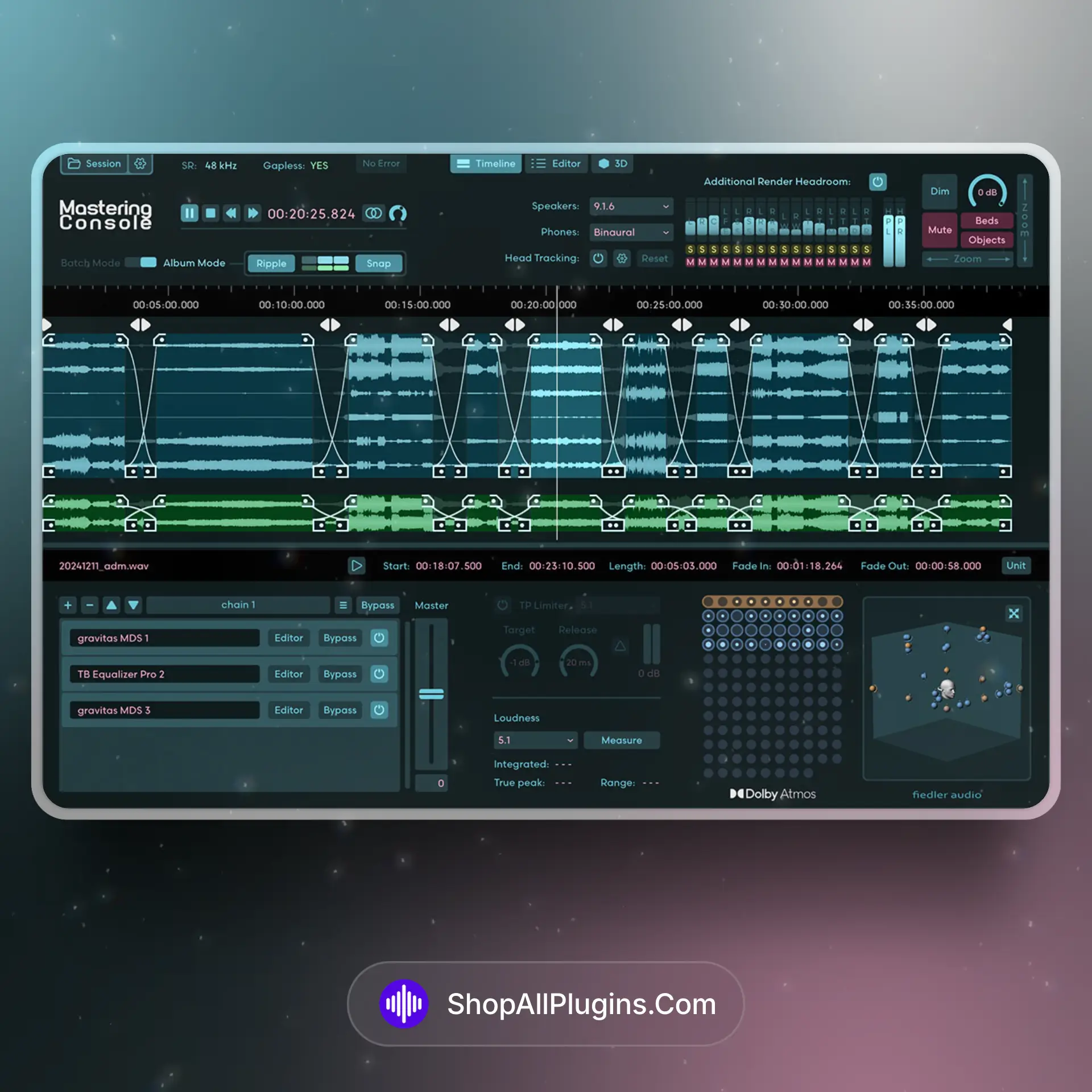





Reviews
Clear filtersThere are no reviews yet.