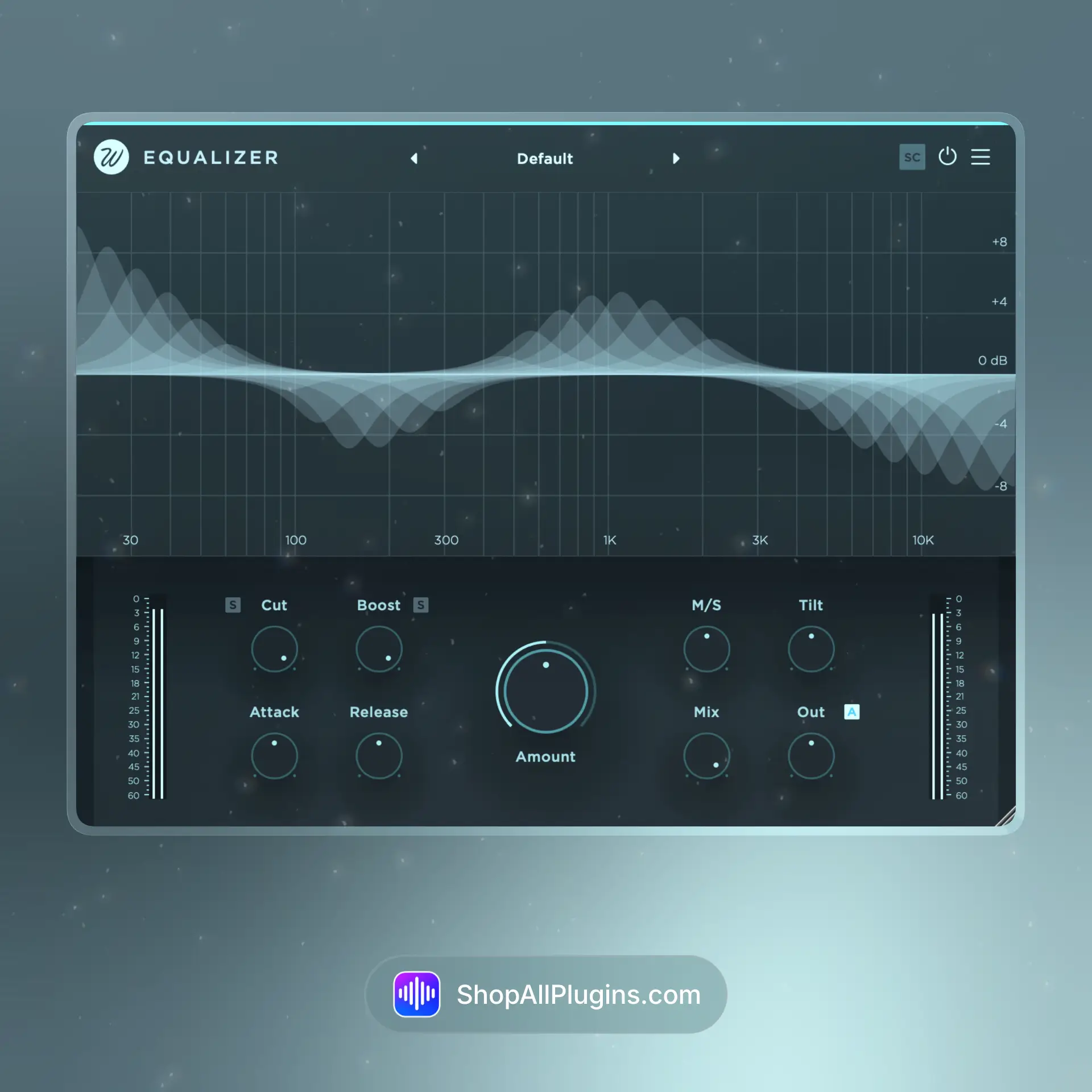
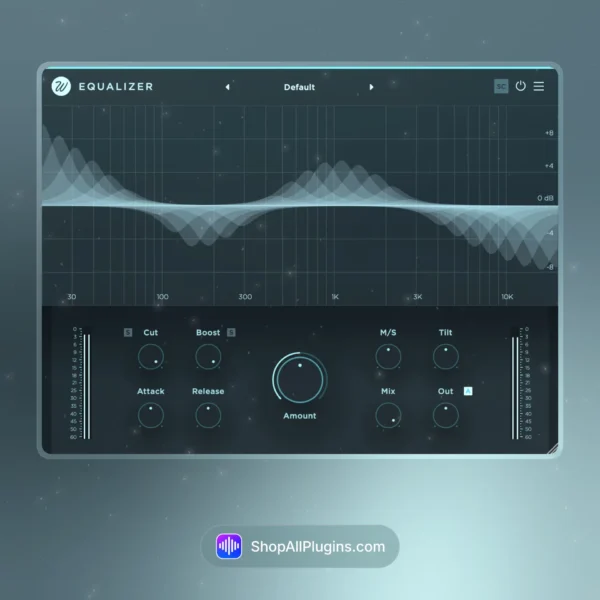
Wavesfactory Equalizer is an intelligent auto-EQ plugin that balances your audio in a fast, musical way, using a simple workflow that still gives you real control. Instead of you hunting frequencies for hours, it analyzes the signal across many bands and applies dynamic cut and boost to help tracks feel more even, less harsh, and more mix-ready. It is especially useful when you want quick clarity on vocals, drums, guitars, synths, or when you need a gentle master bus polish without turning the session into a surgical EQ marathon.
🎛️ What’s Inside
| Module / Feature |
What it does |
Perfect for |
| Intelligent Auto-EQ Engine |
Splits your audio into many frequency bands and automatically adjusts gain per band to reach a more balanced tonal result. |
Fast mix cleanup, smoothing harsh tracks, balancing vocals, tightening instruments. |
| Single-Knob Core Workflow |
A simple main control for how much processing you want, so you can dial it in quickly like a producer tool. |
Quick decisions, fast sessions, tight deadlines, songwriting and mixing. |
| Tilt Control |
Instantly favors brightness or warmth while the plugin keeps overall balance in check. |
Dark vocals, dull samples, bright synths, quick tonal direction. |
| Attack and Release |
Controls how fast the EQ moves so you can keep it transparent or make it react more obviously. |
Drum transients, dynamic vocals, instruments with changing tone, bus work. |
| Delta Audition and Per-Band Amount |
Hear what is being removed or added and adjust how much processing happens across the bands. |
Learning what it is doing, fine tuning, avoiding over-processing. |
| Mid/Side Processing |
Process the center and sides separately to keep vocals focused while controlling stereo energy. |
Wide mixes, mastering polish, stereo loops, vocal clarity in the mid. |
| Mix and Output with Auto-Gain |
Blend wet and dry easily and keep level changes under control so you can judge tone without volume tricks. |
Subtle enhancement, parallel EQ behavior, faster A/B decisions. |
| Sidechain Input and HQ Mode |
Sidechain lets the processing react to another signal, and HQ mode increases precision (useful for offline renders when you want maximum quality). |
Advanced mix tricks, more refined rendering, controlled behavior in complex sessions. |
🎯 Why Producers Choose It
💡 Key Benefits
- Fast tonal balance when you want a track to sit in the mix quickly.
- Reduces harshness and helps dull sources feel more present without heavy EQ boosts.
- Simple main control that still lets you fine-tune attack, release, and tilt.
- Great on busses for gentle glue and overall cohesion.
- Works in any DAW as a VST, VST3, AU, or AAX audio plugin.
🎨 Best Use Cases
- Quick vocal tone balancing for pop, RnB, and hip hop.
- Evening out guitars and keys so they stop fighting the vocal.
- Making drum loops feel more controlled without heavy compression.
- Shaping samples and synths for cleaner mixes in EDM and house.
- Light master bus balancing for demo masters and quick mix checks.
Standout feature: Equalizer is designed to keep your audio balanced by dynamically adjusting many frequency bands at once, so you can get a smoother, more cohesive tone fast, then fine-tune the feel with tilt, timing, mid/side, and mix controls.
📋 Technical Specs
| Plugin Formats |
VST, VST3, AU, AAX, 64 bit |
| Windows Requirements |
Windows 7 or later, 64 bit |
| macOS Requirements |
macOS 10.13 or higher, 64 bit, Intel or Apple Silicon |
| CPU Load |
Low to medium (HQ mode is high and best used for offline rendering or selective use) |
| Tested DAWs |
Ableton Live 11 and 12, Logic Pro, FL Studio 21+, Cubase 13, Studio One 6+, Reaper, Pro Tools 2024+ |
| Apple Silicon Native |
Yes, native support for Apple Silicon M1 to M4 on supported macOS systems |
✅ Instant Download – fast digital delivery via ShopAllPlugins
✅ License – Wavesfactory Equalizer activation
✅ Content – intelligent auto-EQ with tilt, timing controls, mid/side processing, delta audition, mix and output with auto-gain, sidechain input, and HQ mode
✅ Workflow – faster tonal balance for mixing, mastering touches, and sound design inside your DAW
💡 Pro Tip
On vocals, keep the main amount low and use tilt to add just a touch of brightness, then slow the timing so it moves gently. You get a more even vocal tone without that over-processed auto EQ feeling.
❓ FAQ
What is Wavesfactory Equalizer
Wavesfactory Equalizer is an intelligent auto-EQ plugin that balances your audio by dynamically adjusting multiple frequency bands to create a more even tonal result.
Does Wavesfactory Equalizer work natively on Apple Silicon M1 M2 M3 M4
Yes, Wavesfactory Equalizer supports native Apple Silicon M1 to M4 on supported macOS systems.
Will Wavesfactory Equalizer work in my DAW
If your DAW supports VST, VST3, AU, or AAX 64 bit, you can use it in Ableton Live, Logic Pro, FL Studio, Cubase, Studio One, Reaper, and Pro Tools.
Is Wavesfactory Equalizer good for mastering
Yes, it can be used on the mix bus or master for gentle balance and cohesion, especially when used subtly with mix control and proper gain staging.
How do I avoid over-processing with auto EQ
Use a low amount, blend with the mix knob, and adjust attack and release so the EQ moves smoothly rather than reacting too aggressively.
🏁 Final Word
Wavesfactory Equalizer is for producers and engineers who want fast tonal balance that still feels musical. If you need a smart EQ for vocals, drums, instruments, or light master bus shaping, Equalizer helps you get a cohesive sound quickly inside any DAW.













 Immediate Digital Delivery
 Reliable Customer Service
 Secure Payments















Reviews
Clear filtersThere are no reviews yet.