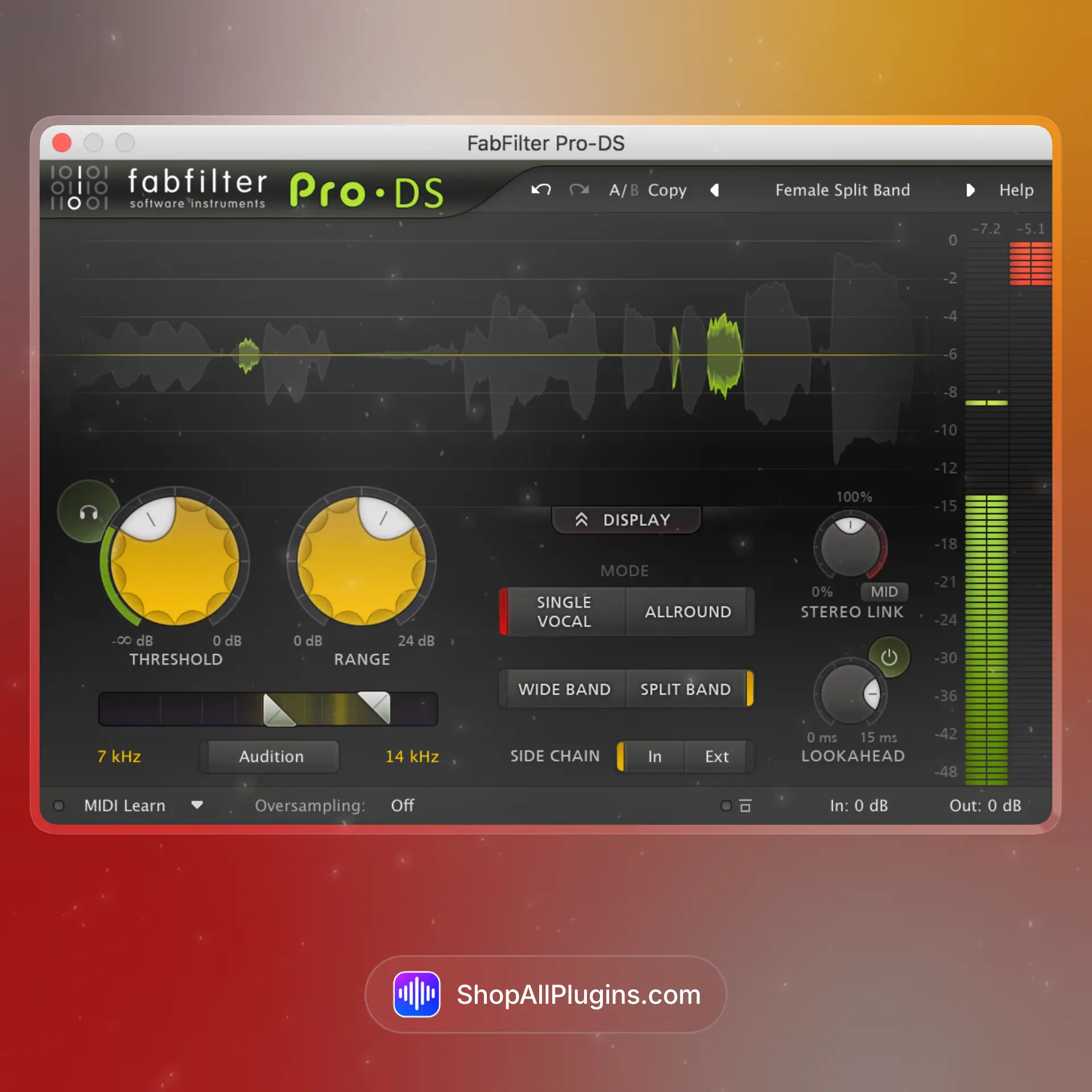
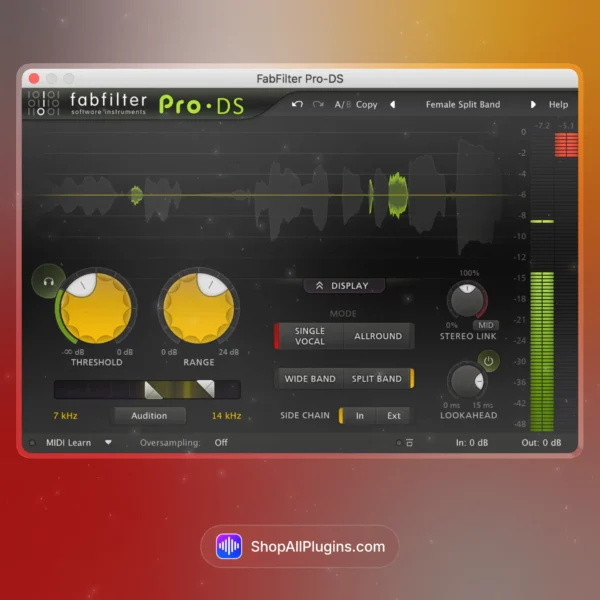
FabFilter Pro-DS is a clean, modern de-esser plugin built for controlling harsh sibilance and sharp high frequencies without dulling your vocal. It is made for producers and engineers who want fast results on vocals, dialogue, and bright instruments, with intelligent detection, split-band processing, and an interface that makes it easy to target exactly what is bothering you. Pro-DS is also included in the FabFilter Total Bundle, so it is a common studio go-to for vocal mixing in any DAW.
🎛️ What’s Inside
| Module / Feature |
What it does |
Perfect for |
| Intelligent Sibilance Detection |
Automatically finds harsh sibilance in the high frequencies and reduces it smoothly without crushing the whole top end. |
Vocals, dialogue, podcasts, voiceover, bright recordings. |
| Single Vocal vs Allround Modes |
Choose between vocal-focused behavior or a more general high-frequency taming mode for instruments and mixes. |
Lead vocals, backing vocals, acoustic guitar, overheads, synth brightness control. |
| Wide Band and Split Band Processing |
Wide band reduces the whole signal when sibilance hits, while split band targets only the sibilant range for cleaner tone. |
Natural vocal tone, clean top end, transparent de-essing. |
| Audition and Band Listening |
Listen to what is being detected so you can set the threshold and range accurately. |
Fast setup, avoiding lisping, precise tuning. |
| Lookahead and Adaptive Processing |
Lookahead helps catch sharp consonants smoothly, and adaptive behavior keeps reduction musical across phrases. |
Modern vocal mixes, tight pop vocals, clean dialogue and streaming audio. |
| Stereo and Mid/Side Support |
Process stereo sources with flexible channel options for mix or mastering use. |
Backing vocals, stereo synths, overheads, mix bus brightness control. |
🎯 Why Producers Choose It
💡 Key Benefits
- Clean de-essing that reduces sibilance without killing brightness.
- Fast setup with intelligent detection and easy auditioning.
- Split-band mode keeps the vocal tone natural and avoids dullness.
- Works on vocals and instruments using Single Vocal and Allround modes.
- Studio standard compatibility across major DAWs and formats.
🎨 Best Use Cases
- Lead vocal de-essing for pop, RnB, hip hop, and melodic rap.
- Dialogue cleanup for podcasts, film, and content creation.
- Taming harsh overheads or cymbal brightness in drum mixes.
- Controlling sharp synth highs without losing energy.
- De-essing stacked backing vocals while keeping air and sparkle.
Standout feature: Pro-DS combines intelligent detection with split-band processing, so you can tame harsh S and T sounds while keeping the vocal bright, open, and natural.
📋 Technical Specs
| Plugin Formats |
VST, VST3, AU, CLAP, AAX Native, AudioSuite, 64 bit |
| Windows Requirements |
Windows 11, 10, 8, 7 or Vista, 32 bit or 64 bit, VST 2/3 or CLAP host, or Pro Tools |
| macOS Requirements |
macOS 10.13 or higher, 64 bit only, AU, VST 2/3 or CLAP host, or Pro Tools, Apple Silicon or Intel |
| CPU Load |
Low (can increase slightly with lookahead and high quality settings) |
| Tested DAWs |
Ableton Live 11 and 12, Logic Pro, FL Studio 21+, Cubase 13, Studio One 6+, Reaper, Pro Tools 2024+ |
| Apple Silicon Native |
Yes, native support for Apple Silicon M1 to M4 on supported macOS systems |
✅ Instant Download – fast digital delivery via ShopAllPlugins
✅ License – FabFilter Pro-DS activation
✅ Content – de-esser plugin with intelligent detection, split-band and wide-band modes, auditioning, and lookahead control
✅ Workflow – fast sibilance control for vocals, dialogue, and bright instruments inside your DAW
💡 Pro Tip
To avoid a lisp, keep the threshold conservative and use split-band mode first. Solo the detection with Audition, find the exact S zone, and aim for smooth reduction only on the sharpest consonants.
❓ FAQ
What is FabFilter Pro-DS
FabFilter Pro-DS is a professional de-esser plugin that reduces harsh sibilance and sharp high frequencies in vocals and other bright sources.
Does Pro-DS work natively on Apple Silicon M1 M2 M3 M4
Yes, Pro-DS supports native Apple Silicon M1 to M4 on supported macOS systems.
Will Pro-DS work in my DAW
If your DAW supports VST, VST3, AU, AAX, CLAP, or AudioSuite, you can use Pro-DS in Ableton Live, Logic Pro, FL Studio, Cubase, Studio One, Reaper, and Pro Tools.
What is the difference between split-band and wide-band de-essing
Split-band mode reduces only the sibilant frequency range for a more natural tone, while wide-band mode reduces the full signal when sibilance hits for stronger control.
Is Pro-DS only for vocals
No, it works great on overheads, acoustic guitar, bright synths, and any source where harsh high frequencies need smooth control.
🏁 Final Word
FabFilter Pro-DS is for producers and engineers who want clean vocal brightness without harsh S sounds. If you need a de-esser that is fast to set up, transparent, and reliable across vocals, dialogue, and bright instruments, Pro-DS is a strong daily tool in any DAW.











 Immediate Digital Delivery
 Reliable Customer Service
 Secure Payments










Reviews
Clear filtersThere are no reviews yet.