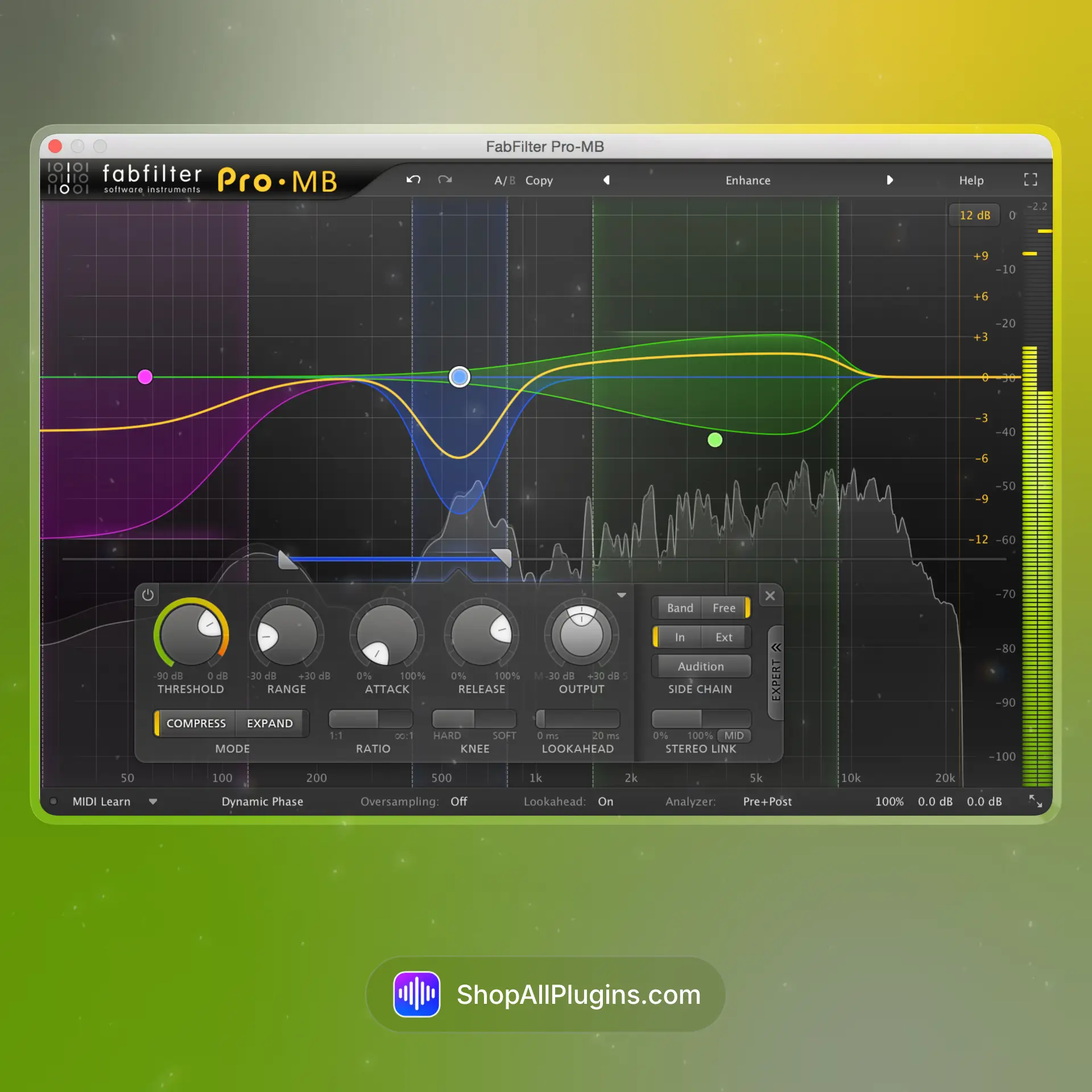
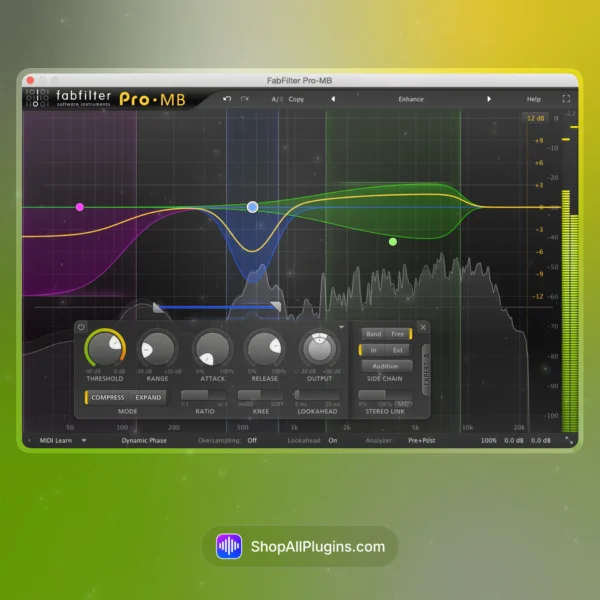
FabFilter Pro-MB is a high-end multiband dynamics plugin built for precise control of frequency-dependent compression and expansion. Instead of compressing the whole signal, Pro-MB lets you tame harshness, tighten low end, control boomy mids, or add punch only where you need it, making it a favorite for clean modern mixing, mastering, and vocal or instrument problem-solving. Pro-MB is also included in the FabFilter Total Bundle, so it is a common studio tool across major DAWs.
🎛️ What’s Inside
| Module / Feature |
What it does |
Perfect for |
| Dynamic Bands (Compression or Expansion) |
Create bands anywhere in the spectrum and apply downward compression, upward compression, or expansion based on your settings. |
Controlling harshness, tightening bass, shaping vocals, dynamic mix cleanup. |
| Single Band Mode |
Acts like a focused dynamic EQ style processor when you only need one band to react to a problem area. |
De-harshing, de-mudding, resonant control, vocal presence control. |
| Sidechain and External Triggering |
Use internal or external sidechain input to trigger band compression for ducking and frequency-based separation. |
Kick and bass separation, vocal clarity, dialogue ducking, mix space control. |
| Mid/Side Processing |
Process the mid and side channels differently to keep the center stable while shaping width and ambience. |
Master bus control, stereo imaging stability, widening without harshness. |
| Linear-Phase and Minimum-Phase Modes |
Choose crossover behavior depending on the task, with options designed for transparent multiband processing. |
Mastering, clean bus work, precise multiband control. |
| Real-Time Spectrum and Gain Display |
Shows exactly where compression is happening, how much, and how the bands interact with the signal. |
Fast decisions, learning multiband, surgical problem solving. |
| Band Solo and Audition |
Solo bands to hear what you are controlling and avoid over-processing. |
Finding harsh zones, isolating low end issues, precise tuning. |
🎯 Why Producers Choose It
💡 Key Benefits
- Targeted multiband control to fix problems without flattening the whole mix.
- Works like dynamic EQ when needed with single-band focus for fast cleanup.
- Clean low end management for bass, kick, and mastering chains.
- Mid/side options for controlling center vs width in stereo mixes.
- Visual workflow that makes multiband compression easier to dial quickly.
🎨 Best Use Cases
- Tightening low end in EDM, hip hop, trap, and pop masters.
- Reducing harshness in vocals, cymbals, and synths without dulling the whole mix.
- Keeping guitars and keys controlled in dense arrangements.
- Multiband sidechain ducking for kick and bass separation.
- Master bus smoothing for consistent translation across speakers and headphones.
Standout feature: Pro-MB gives you flexible bands with clean crossover modes and detailed metering, so you can control dynamics per frequency like a multiband compressor and dynamic EQ in one workflow.
📋 Technical Specs
| Plugin Formats |
VST, VST3, AU, CLAP, AAX Native, AudioSuite, 64 bit |
| Windows Requirements |
Windows 11, 10, 8, 7 or Vista, 32 bit or 64 bit, VST 2/3 or CLAP host, or Pro Tools |
| macOS Requirements |
macOS 10.13 or higher, 64 bit only, AU, VST 2/3 or CLAP host, or Pro Tools, Apple Silicon or Intel |
| CPU Load |
Low to medium (can increase with many bands, linear-phase mode, and high quality settings) |
| Tested DAWs |
Ableton Live 11 and 12, Logic Pro, FL Studio 21+, Cubase 13, Studio One 6+, Reaper, Pro Tools 2024+ |
| Apple Silicon Native |
Yes, native support for Apple Silicon M1 to M4 on supported macOS systems |
✅ Instant Download – fast digital delivery via ShopAllPlugins
✅ License – FabFilter Pro-MB activation
✅ Content – multiband dynamics processor with flexible bands, mid/side, sidechain options, crossover modes, and detailed visualization
✅ Workflow – frequency-focused compression and expansion for mixing, mastering, and clean modern production in any DAW
💡 Pro Tip
If your mix gets harsh in the chorus, add one band around 2 kHz to 6 kHz and set it to compress only when the vocal, cymbals, or synths spike. You will keep energy and brightness without the mix feeling sharp.
❓ FAQ
What is FabFilter Pro-MB
FabFilter Pro-MB is a multiband dynamics plugin that lets you compress or expand specific frequency ranges for precise mixing and mastering control.
Does Pro-MB work natively on Apple Silicon M1 M2 M3 M4
Yes, Pro-MB supports native Apple Silicon M1 to M4 on supported macOS systems.
Will Pro-MB work in my DAW
If your DAW supports VST, VST3, AU, AAX, CLAP, or AudioSuite, you can use Pro-MB in Ableton Live, Logic Pro, FL Studio, Cubase, Studio One, Reaper, and Pro Tools.
Can Pro-MB work like a dynamic EQ
Yes, by using a single band and setting it to react only when the target frequency gets too loud, Pro-MB can behave like a dynamic EQ style processor.
Can I do multiband sidechain ducking with Pro-MB
Yes, Pro-MB supports sidechain triggering, so you can duck specific frequency bands based on another track, like carving room for kick and bass.
🏁 Final Word
FabFilter Pro-MB is for producers and engineers who want control without overprocessing. If you need to tighten low end, smooth harshness, add controlled punch, or clean up a master with frequency-focused dynamics, Pro-MB gives you a flexible multiband workflow that stays clean in any DAW.











 Immediate Digital Delivery
 Reliable Customer Service
 Secure Payments
















Reviews
Clear filtersThere are no reviews yet.